Chroma Siting Tests
Table of contents
The detail behind Chroma Siting: the results for each converter and format, how the test charts work, what each player and FFmpeg version did, and how it was measured. If you only want to check a player, start with the quick guide.
Results by converter
Converting RGB to 4:2:2 and 4:2:0. Positions are in luma samples: 0 is co-sited, 0.5 is centred. The results were the same on 6.0, 7.0, 7.1, 8.0.1, 8.1, 9.0 and a 9.1 development build, except where noted.
| Converter | 4:2:2, should be co-sited (BT.709 item 4.3) | 4:2:0 (horizontal / vertical), should be co-sited / centred (H.264/H.265 Annex E default) | Correct? |
|---|---|---|---|
zscale (default) | co-sited | co-sited / centred | Yes |
zscale=...:chromal=center | centred | centred / centred | Only for formats that want centred chroma |
scale, or no filter | centred, pair-averaged | centred / centred | No |
scale=...:flags=unstable (8.1+) | centred, pair-averaged | centred / centred | No, the same as scale |
scale=...:out_chroma_loc=left (7.1+) or out_h_chr_pos=0 | -0.05, pair-averaged | -0.05 / centred | Close, not exact |
as above, plus -sws_flags +full_chroma_inp | co-sited | co-sited / centred | Yes |
no filter, -chroma_sample_location left | centred; co-sited (-0.05) in 9.1.dev | the same | Not in any release yet |
“Pair-averaged” means the converter averaged each pair of RGB pixels into one chroma value before filtering: a line on an even column and a line on the following odd column give exactly the same chroma. libswscale does this for RGB input unless full_chroma_inp is set, whatever position it is asked for, which is why asking for co-sited without that flag only gets to within 0.05 of a pixel. Note that this contradicts older advice (including earlier versions of FFmpeg swscale Filter) that full_chroma_inp does nothing for RGB input.
The last row is a change that is coming: in FFmpeg development builds after 9.0, -chroma_sample_location is passed into the filter graph, the way 7.1 started doing for -colorspace, so the conversion FFmpeg inserts follows it. In 9.0 and earlier it does not affect the conversion.
Where the chroma samples went
Each bar is one chroma (Cb) sample, drawn where a co-sited format says it is, under the blue marker for the source line. Rows: zscale, scale, scale with out_chroma_loc=left and full_chroma_inp.
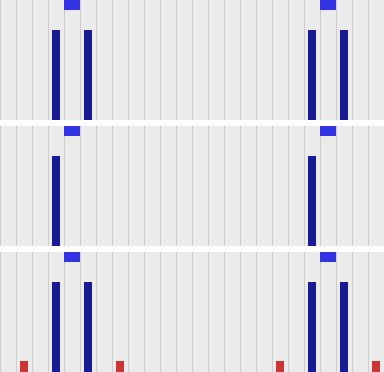
For a line on an odd column, which falls between two co-sited chroma samples, zscale and the corrected scale put equal amounts in the samples either side. Plain scale puts it all in the sample to the left: it has averaged the line with its neighbour into a single, centred value. The small red bars on the bottom row are the bicubic filter’s ringing.
What each format records
What FFmpeg 9.0 writes, for frames that carry a chroma location (VP9 measured on 6.1.6 and 9.0.2, the same on both):
| Codec | Field | 4:2:0 | 4:2:2 |
|---|---|---|---|
| H.264 | VUI chroma_sample_loc_type (4:2:0 only) | Written, except left (the default, which readers assume when nothing is written) | No field; assumed co-sited |
HEVC (libx265) | VUI, as H.264 (4:2:0 only) | Written | No field |
AV1 (libsvtav1) | chroma_sample_position (4:2:0 only) | left and topleft written; AV1 has no value for centred | No field |
AV1 (libaom-av1) | as above | Always written as unknown: FFmpeg’s libaom wrapper does not pass it on | No field |
VP9 (libvpx-vp9) | None in the bitstream. In MP4 the vpcC box’s chromaSubsampling (see the MOV / MP4 row below) | MP4: left written as 0 (vertical), anything else, including center and no location, as 1 (co-located, i.e. topleft): centred chroma is mislabelled | MP4: 2, no siting |
| ProRes, DNxHD/DNxHR | None | Assumed co-sited |
| Container | Field | Behaviour |
|---|---|---|
| Matroska / WebM | ChromaSitingHorz, ChromaSitingVert | Written for every codec and subsampling, and read back by FFmpeg. The only container here that records siting for every codec and FFmpeg reads back. |
| MXF | ColorSiting | Written, but not read back by FFmpeg. With no location on the frames, 4:2:2 is written as 0 (co-sited). FFmpeg maps left to 6 and center to 3 whatever the subsampling, which are ST 377-1’s 4:2:0 values; for 4:2:2 the matching values would be 0 and 1. |
| MOV / MP4 | None, except VP9’s vpcC | Only what the codec stream itself carries, apart from VP9 in MP4 (above). FFmpeg does not read vpcC back: ffprobe shows unspecified. |
DNxHR in MXF
MXF does record siting, which makes a mismatch worse rather than better: the file states the wrong thing. Encoding the test chart to DNxHR HQX 4:2:2 in MXF (OP1a and OP-Atom gave the same results; also the same on 6.0, 7.1 and 9.0):
| Command | MXF ColorSiting | Chroma actually is |
|---|---|---|
scale=in_range=full:in_color_matrix=bt709:out_range=tv:out_color_matrix=bt709 | 0, co-sited | centred: the label is wrong |
zscale=rangein=full:matrix=709:range=limited | 0, co-sited | co-sited |
zscale=...:chromal=left | 6, vertical midpoint | co-sited, but the label is odd for 4:2:2 |
scale with out_chroma_loc=left and full_chroma_inp | 6, vertical midpoint | co-sited |
FFmpeg names 4:2:2 co-siting topleft, and maps left to MXF value 6, “vertical midpoint”, which ST 377-1 defines as the MPEG-2 and H.264 4:2:0 position. For 4:2:2 that is the wrong value: a reader that takes it literally sees 4:2:0 siting on 4:2:2 material. So for 4:2:2 MXF, leave zscale’s chroma location at its default (or use topleft), which gives 0; do not set it to left.
Reading back to RGB, measured
Measured by decoding 4:2:2 and 4:2:0 versions of the test chart with known siting to 16-bit RGB PNG, with and without a chroma location tag (FFV1 in Matroska, which carries the tag through to FFmpeg’s decoder). Positions are in luma samples: 0 is co-sited, 0.5 centred.
| Converter | Tagged left or topleft,should follow the tag | Tagged center,should follow the tag | No tag (chroma co-sited), should assume co-sited (BT.709 item 4.3) |
|---|---|---|---|
zscale | Correct | Correct | Assumes co-sited: correct |
scale, or no filter, 6.1 to 9.0 | Assumes centred: chroma 0.5 to the right | Correct | Assumes centred: 0.5 to the right |
scale, or no filter, 9.1.dev | Follows the tag (within 0.07) | Correct | Assumes centred: 0.5 to the right |
The results were the same on 6.1.6, 7.0, 7.1.5, 8.0.1, 8.1 and 9.0.2; the 9.1 development build (N-127508) is the only one that differs, and only for coarse detail when converting to packed RGB such as PNG: the finest chroma detail still comes out as if centred (see How it works). -sws_flags +full_chroma_int (or scale=flags=...+full_chroma_int) makes libswscale interpolate the chroma instead of repeating each sample across two pixels, which it otherwise does when converting 4:2:x to RGB, but it does not change the position it assumes.
The 4:2:2 player chart
Players and browsers make the same choice when they display 4:2:2, and most of them cannot be measured from a script. For those there is a chart you look at instead: sourceimages/chroma_siting_player_chart_422-prores.mov (ProRes 422 HQ), -hevc.mp4 (HEVC 4:2:2 10-bit, which browsers play), -h264.mp4 (lossless H.264 4:2:2 10-bit) and -dnxhr.mxf (DNxHR HQX), with a lossless FFV1 copy in chroma_siting_player_chart_422-lossless.mkv, and two deliberately mislabelled files (see Does the player read the label?). They are made by sourceimages/make_chroma_siting_player_chart.py. The chroma in every file is co-sited, and the encodes keep the pattern intact (zscale decodes all of them exactly), so a wrong band is the player, not the file. Do not re-encode them: heavier compression blurs the one-pixel stripes. For 4:2:0 there is a second chart, which tests across and down separately; see The 4:2:0 chart. To look at the pixels themselves, see Checking the pixels.
Reading the chart
- Show it at exactly 100%: one image pixel per screen pixel (“1:1” in RV and xStudio, not “fit”; in a browser, page zoom 100% and a window wide enough for the whole frame). The patch at the top right is the check: from a distance its two halves should look equally bright. If the fine half looks darker, the player is scaling the picture, and the bands mean nothing.
- Step back, or look at it from across the room. Each band is a checkerboard of striped blocks. The band that turns into a uniform field says how the player rebuilds the chroma. For a correct player that is the top one: H.264, HEVC, ProRes and DNxHD/DNxHR 4:2:2 are all co-sited.
| Band | Uniform when the player | Typical of |
|---|---|---|
| Co-sited (correct) | treats the chroma as co-sited and interpolates it | zscale; xStudio with the fix below |
| Centred, linear | treats it as centred, linear interpolation | GPU texture sampling (RV); libswscale bilinear |
| Centred, bicubic | treats it as centred, bicubic or lanczos | libswscale to planar RGB, or with full_chroma_int |
| Sample repeat | uses each chroma sample for two pixels | libswscale to packed RGB (e.g. writing a PNG), up to 9.0 |
If no band is uniform, the player is doing something else, for example converting to 4:2:0 or using the nearest chroma sample. Look closer for stripes that should not be there (see Safari below).
What the chart looks like from a distance (simulated by averaging in linear light), decoded by zscale (left) and by libswscale to planar RGB on 9.0 (right):
zscale: top band uniform | libswscale, centred bicubic: third band uniform |
|---|---|
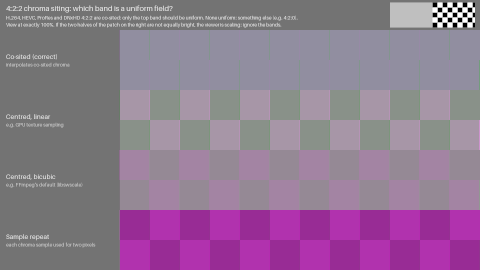 | 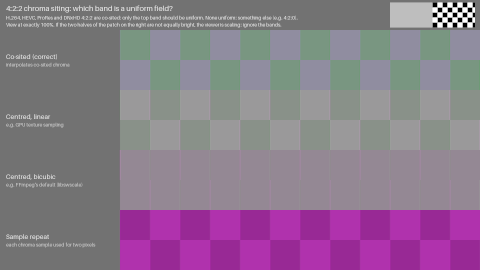 |
These are pictures of the result, already converted to RGB, so they look the same in any viewer. The test is the video files.
How it works
The test blocks have vertical stripes in a four-pixel cycle, with the two chroma samples on the even (co-sited) columns. 4:2:2 keeps those and drops the odd columns, so the player has to rebuild the odd columns’ chroma, and how it does that depends on where it thinks the samples are. The reference blocks have the same stripes turned through 90 degrees, which 4:2:2 holds exactly, since it has full vertical chroma resolution. Each band’s reference stripes are set to the pixels one kind of player makes from its test stripes. In the band that matches the player, test and reference blocks then contain exactly the same pixels, so they match whatever the display, its gamma, or a view transform such as ACES does to them.
The difference between the blocks only appears when the display turns each pixel into light and the eye averages it. Y’CbCr to R’G’B’ is linear, so the average code value of a test block is the same for every player. A viewer that shrinks the picture averages code values before the display does, which removes the difference. At half size or less a wrong player then looks right, hence the scale check, which is also pure black and white for the same reason. The colors were chosen so that each wrong band differs from the right one by at least 0.04 in Oklab (linear-light means, gamma 2.4), with every pixel in gamut for every kind of player, so the result does not depend on clipping.
The chart tests the finest chroma detail 4:2:2 can hold. A player can place coarse color correctly and still fail here: FFmpeg 9.1.dev, decoding to packed RGB, puts a slow chroma sine within 0.03 pixel of the right place but rebuilds the finest detail as a centred filter would, so the chart shows it as centred bicubic, while the decode test in Reading back to RGB, which blurs before it measures, sees it as co-sited.
What players do
Measured on macOS 26 (Apple M2), from window screenshots at 1:1 (screencapture -o -l), with tests/chroma_siting_player_chart.py --capture; Safari, OpenRV and xStudio were also checked by eye.
| Player | ProRes 422 HQ, should be co-sited (BT.709 item 4.3) | HEVC 4:2:2, should be co-sited (BT.709 item 4.3) | H.264 4:2:2, should be co-sited (BT.709 item 4.3) |
|---|---|---|---|
| Safari 26.6.2 | None uniform: nearest sample, see below | Co-sited (correct) | Co-sited (correct) |
| Chrome 156 | Does not play | Co-sited (correct) | Centred, linear |
| Firefox 152 | Does not play | None uniform: vertical chroma also lost, as in 4:2:0 | Does not play |
| OpenRV 3.1.0 | Centred, linear | Centred, linear | Centred, linear |
| xStudio 1.4.0 | Left half co-sited, right half sample repeat | the same | the same |
FFmpeg, measured on the FFV1 copy with python tests/chroma_siting_player_chart.py:
| Conversion | 6.1.6 and 9.0.2 | 9.1.dev |
|---|---|---|
zscale | Co-sited | Co-sited |
No filter, to packed RGB (PNG, rgb24, rgb48) | Sample repeat | Centred, bicubic (finest detail only, see above) |
No filter, to planar RGB (gbrp16le) | Centred, bicubic | Co-sited (the file is tagged left) |
scale=flags=bilinear+full_chroma_int | Centred, linear | Co-sited |
scale=flags=bicubic+full_chroma_int, lanczos+full_chroma_int | Centred, bicubic | Co-sited |
Notes on the players:
- Chrome shows HEVC correctly but not H.264 4:2:2. A likely explanation, not confirmed, is that HEVC is decoded and displayed by macOS, while 10-bit 4:2:2 H.264 is decoded in software and converted by Chrome itself. Edge (the same engine) was not measured.
-
Safari’s ProRes path takes each odd column’s chroma from the nearest sample, but every odd column is exactly halfway between two samples, so floating-point rounding decides which one it gets. It switches between left and right in runs, which show as vertical stripes, and along a diagonal where the two triangles that draw the video frame meet. Over an area this is close to right (the top band is nearly uniform), but every odd pixel is wrong. The pattern also changes depending on whether the window is in front, and only one state can be captured.
- Firefox keeps the horizontal siting but smears the chroma vertically, so the reference blocks are wrong too.
- OpenRV stores the file’s chroma placement but does not use it: its shader samples the half-width chroma texture with linear filtering, which is centred.
-
xStudio interpolates 10/12-bit 4:2:2 chroma correctly, but a bounds check in its YUV shader stopped it at the middle of the picture, and the right half repeats each sample. The same happens with VideoToolbox and with FFmpeg decoding. A fix has been made (
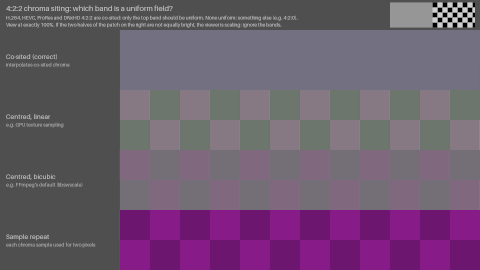
image_coord.x*2 < frame_width_pixelsbecomesimage_coord.x + 1 < frame_width_pixelsinsrc/plugin/media_reader/ffmpeg/src/ffmpeg.cpp) but is not yet merged. Its 8-bit path always repeats each sample.xStudio 1.4.0: the top band changes half way across With the fix 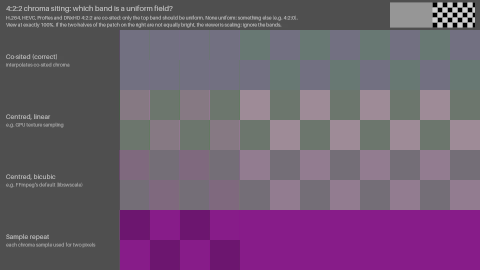
Does the player read the label?
MOV and MP4 have nowhere to record 4:2:2 siting, so with those files a player can only use its own assumption, which is what the table above shows. Matroska and MXF can record it (see What each format records). To see whether a player reads that label, there is a second copy of each with the same co-sited pixels and a label that says centred:
chroma_siting_player_chart_422-lossless.mkvis labelledleft(co-sited);-labelled-center.mkvis labelledcenter.-dnxhr.mxfhasColorSiting0 (co-sited);-dnxhr-labelled-center.mxfhasColorSiting1 (horizontal mid-point, ST 377-1’s value for centred 4:2:2). FFmpeg cannot write 1 (it writes 3 forcenter, a 4:2:0 value), so the generator patches that byte.
A player that ignores the label shows the same band for both files of a pair. One that reads it shows a centred band for the mislabelled file, which is the right thing to do with a label even when, as here, the label is wrong.
| Player | MKV left / center | MXF ColorSiting 0 / 1 |
|---|---|---|
FFmpeg zscale (9.0.2, 9.1.dev) | Co-sited / centred linear: reads it | Co-sited / co-sited: does not read it |
| FFmpeg, no filter, to planar RGB, 9.0.2 | Centred bicubic / centred bicubic: ignores it | Centred bicubic / centred bicubic |
| FFmpeg, no filter, to planar RGB, 9.1.dev | Co-sited / centred bicubic: reads it | Centred bicubic / centred bicubic: no label, so assumes centred |
| OpenRV 3.1.0 | Centred linear / centred linear: ignores it | Centred linear / centred linear: ignores it |
FFmpeg does not read MXF’s ColorSiting at all, so neither does anything built on it. An MXF reader that does, such as an edit or broadcast system, can be checked with the MXF pair; we have not tested one. Remember also that FFmpeg writes 6 (“vertical midpoint”, a 4:2:0 value) for 4:2:2 frames tagged left (DNxHR in MXF), which such a reader might take literally.
What a browser draws into a <canvas> (drawImage) is not what it shows on screen: Safari’s canvas was correct for ProRes and Chrome’s was wrong for HEVC, the reverse of the screen. So a page that reads the video back cannot measure a browser; use screenshots, or your eyes.
The 4:2:0 chart
4:2:0 halves the chroma down as well as across, and the two can be wrong independently, so its chart has two pairs of bands. It is sourceimages/chroma_siting_player_chart_420-hevc.mp4 (HEVC Main 10, which browsers play) and -h264.mp4 (8-bit H.264 High, the most common delivery format), with a lossless FFV1 copy in chroma_siting_player_chart_420-lossless.mkv, made by sourceimages/make_chroma_siting_player_chart_420.py. Read it the same way (exactly 100%, the same scale check, from a distance), but expect two uniform bands, one per pair:
| Band | Uniform when the player treats the chroma as | Right for |
|---|---|---|
| Across: co-sited | co-sited across | H.264, HEVC, AV1 and BT.2020 4:2:0 |
| Across: centred | centred across (also sample repeat) | JPEG, MPEG-1 |
| Down: centred (“left”) | centred down | H.264, HEVC and AV1 by default (FFmpeg’s left) |
| Down: co-sited (“topleft”) | co-sited down | BT.2020, and files tagged topleft |
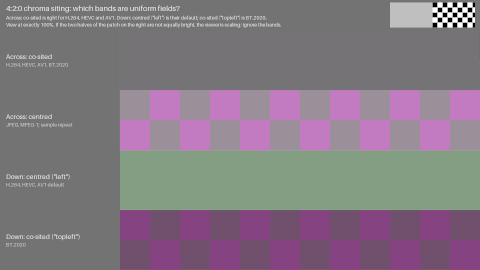
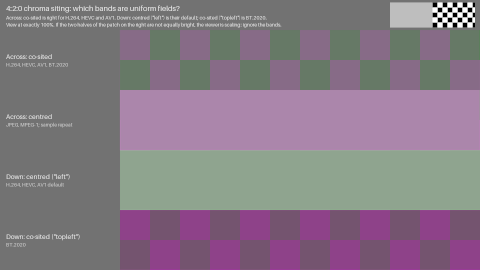
So an ordinary H.264 or HEVC file should give “Across: co-sited” and “Down: centred”. From a distance, decoded by zscale (left, correct) and by libswscale on 9.0 (right, centred both ways):
zscale: across co-sited, down centred | libswscale: across centred, down centred |
|---|---|
 |  |
How it works. There is no direction in which 4:2:0 holds a reference block exactly, so each band compares a striped pattern with its mirror image instead. The stripes run one way only (vertical stripes test across, horizontal ones test down), so the other direction does not matter. If the mirror passes through a chroma sample, any player that treats the samples as co-sited, with any symmetric filter, rebuilds the mirrored block as the exact mirror image of the original: the two contain the same pixels and the band is uniform. A player that thinks the samples are centred pairs luma and chroma differently in the two blocks, and the checkerboard shows. Mirrored between two pixels instead, it is the other way round. The right band matches exactly whatever the filter, and the colors were chosen so the wrong one differs by at least 0.065 (Oklab, linear light), all in gamut. Each band has its own colors, so a uniform band’s color means nothing; only which bands are uniform does. Unlike the 4:2:2 chart, it does not tell linear from bicubic; it only answers where the player thinks the samples are.
The chroma in these files has no true position: the bands show what the player assumes, and which is right depends on the label. In 4:2:0, H.264 and HEVC can carry a chroma location in the VUI, so there are deliberately tagged copies with the same pixels: -hevc-topleft.mp4, -hevc-center.mp4, -h264-topleft.mp4 and -h264-center.mp4. A player that reads the tag should switch to “Down: co-sited” for topleft, and to “Across: centred” for center. The H.264 files are 8-bit, so that browsers play them; -h264-10bit.mp4 (High 10, with -topleft and -center copies) and -hevc-8bit.mp4 separate the codec from the bit depth in a player that treats them differently.
Measured on macOS 26 (Apple M2) from window screenshots at 1:1, as for 4:2:2. Each file should be shown as its tag says, and an untagged file as left, the H.264/H.265 Annex E default. left is co-sited across and centred down, topleft co-sited both ways, center centred both ways:
| Player | HEVC 10-bit, left,should be left | HEVC 10-bit, topleft,should be topleft | H.264 8-bit, untagged, should be left | H.264 10-bit, untagged, should be left | H.264 8-bit, topleft,should be topleft | H.264 8-bit, center,should be center |
|---|---|---|---|---|---|---|
| Safari 26.6.2 | Correct | Follows the tag | Correct | Correct | Centred both ways | Follows the tag |
| Chrome 156 | Correct | Follows the tag | Correct | Centred across | Centred both ways | Follows the tag |
| Firefox 152 | Correct | Ignores the tag | Correct | Correct | Ignores the tag | Ignores the tag |
| OpenRV 3.1.0 | Centred across | Centred both ways | Centred across | Centred across | Centred both ways | Centred both ways |
| xStudio, with the 4:2:2 fix | Correct | Ignores the tag | Centred across | Correct | Ignores the tag | not tested |
All of them play 10-bit H.264, but Chrome shows it centred across, though it gets 8-bit H.264 right. Otherwise Safari and Chrome agree, including an H.264 file tagged topleft coming out centred both ways, which matches neither the tag nor the default; both decode H.264 and HEVC through macOS, which is the likely common cause, but that is not confirmed. In xStudio it is the bit depth, not the codec, that matters: 10-bit H.264 is correct and 8-bit HEVC is centred across. Its shader averages neighbouring chroma samples across only in its 10/12-bit path, and repeats rows (centred down) in both; it ignored every tag we tried (HEVC topleft and center, 8-bit H.264 topleft, 10-bit H.264 center). OpenRV is centred both ways whatever the file says.
The other tagged copies were measured later, with the HDR10 files (Safari 26.6.2 and Chrome 157, on the laptop’s built-in screen; Chrome 157 gave the same results as 156 for the untagged and topleft HEVC files):
-hevc-center.mp4: both follow the tag (centred both ways).-h264-10bit-topleft.mp4: both show it centred both ways, as with the 8-bit H.264topleftfile.-h264-10bit-center.mp4: both show it centred both ways. In Safari that is following the tag, since it shows the untagged 10-bit file correctly. In Chrome it proves nothing, since Chrome shows every 10-bit H.264 file centred across, and centred down is the default anyway.
FFmpeg, with python tests/chroma_siting_player_chart.py --chart sourceimages/chroma_siting_player_chart_420-...:
| Conversion | 6.1.6 and 9.0.2 | 9.1.dev |
|---|---|---|
zscale | Follows the tag (left, topleft, center) | Follows the tag |
| No filter, to planar RGB | Centred both ways, whatever the tag | Follows the tag |
| No filter, to packed RGB (PNG) | Centred both ways, whatever the tag | Centred both ways, whatever the tag (the finest detail; see How it works) |
scale=flags=...+full_chroma_int | Centred both ways | Follows the tag |
The HDR10 copies
HDR video often takes a different path through a player (tone mapping, macOS EDR, a TV’s HDR mode), so the SDR results above do not necessarily carry over, and HDR10 is where the specifications disagree most (see What specifications ask for). There is an HDR10 version of the 4:2:0 chart with the same bands: sourceimages/chroma_siting_player_chart_420-hevc-pq.mp4 (HEVC Main 10, BT.2020, PQ, with mastering display and content light level SEI), with a lossless FFV1 copy in -pq-lossless.mkv. There are three HEVC files with the same pixels; only the VUI differs:
| File | VUI chroma location | Should show |
|---|---|---|
-hevc-pq.mp4 | None (so left, the default) | Across: co-sited, Down: centred |
-hevc-pq-left.mp4 | 0 (left), written explicitly | Across: co-sited, Down: centred |
-hevc-pq-topleft.mp4 | 2 (topleft), as Ultra HD Blu-ray, ATSC 3.0 and DVB BT.2020 use | Across: co-sited, Down: co-sited |
A player that shows -hevc-pq-topleft.mp4 the same as the other two ignores the tag, and would show topleft HDR10 material with the color half a line too low.
The colors had to be chosen again for PQ. Every pixel is between 1 and 100 cd/m2 (MaxCLL 100, MaxFALL 31) and inside the BT.709 gamut. So no display tone maps it, gamut maps it, or crushes it into its black level, and a screenshot does not clip it. The wrong band differs by at least 0.071 in Oklab, against 0.065 for the SDR chart. sourceimages/chroma_siting_420_colours.py checks both sets of colors with the same player models, and found the PQ ones (--search --seed 3).
Viewing it:
- Use an HDR display in its HDR mode, and keep the player window entirely on that display. On a Mac with external SDR monitors, a window on (or partly on) an SDR screen is tone mapped to SDR. Disconnecting the other displays removes any doubt.
- It still has to be shown at exactly 100%, with the same scale check. On a Retina laptop screen at its default scaling a 1920x1080 frame at 100% is 3840 screen pixels wide and does not fit. Switch the display to its native resolution, without HiDPI (System Settings > Displays > Advanced > Show resolutions as list, then Show all resolutions), so one image pixel is one screen pixel.
- On a TV, turn off dynamic tone mapping, sharpening and noise reduction, and use a mode with no picture processing (Filmmaker or Cinema mode). Play the file from USB or a media server; the TV’s own player is often what you want to test.
FFmpeg, with python tests/chroma_siting_player_chart.py --chart sourceimages/chroma_siting_player_chart_420-hevc-pq... (the script uses the PQ EOTF for files with -pq in the name), on 6.1.6, 9.0.2 and 9.1.dev, gives the same answers as for the SDR chart:
| Conversion | 6.1.6 and 9.0.2 | 9.1.dev |
|---|---|---|
zscale | Follows the tag (left, topleft) | Follows the tag |
| No filter, to planar RGB | Centred both ways, whatever the tag | Follows the tag |
Measured on macOS 26.6.2 (Apple M2 Max, built-in Liquid Retina XDR display at its native 3024x1964, no other displays) from full-screen screenshots, analysed with --420 --capture. OpenRV and xStudio are left out: they do not display HDR.
| Player | -hevc-pq.mp4,should be left | -hevc-pq-left.mp4,should be left | -hevc-pq-topleft.mp4,should be topleft |
|---|---|---|---|
| Safari 26.6.2 | Co-sited across; down: neither | Co-sited across; down: neither | Follows the tag |
| Chrome 157 | Co-sited across; down: neither | Co-sited across; down: neither | Follows the tag |
| Firefox 159 | Correct | Correct | Ignores the tag (shown as left) |
| QuickTime Player 10.5 | Co-sited across; down: neither | Co-sited across; down: neither | Follows the tag |
| A TV’s own player | not yet tested | not yet tested | not yet tested |
Safari, Chrome and QuickTime Player agree, as Safari and Chrome do for SDR, so the cause is probably the macOS HDR video path they share (not confirmed). Across is right in every file, and a topleft tag is followed exactly. But the untagged and left files, which should be centred down, match neither: both “Down” bands keep a faint checkerboard, at about a quarter (centred band) and a third (co-sited band) of the contrast of a wrong band, so the chroma is placed between the two positions or blurred vertically; we have not worked out which. The same SDR files, captured the same way, came out right, and the SDR topleft file followed its tag (QuickTime Player as well). So on a Mac, HDR10 tagged topleft is shown as intended by these three, and HDR10 at the H.264/HEVC default is not. Firefox is the opposite: it shows HDR10 as left whatever the tag, which is right for the untagged and left files and wrong for topleft. In SDR, Firefox also ignored the HEVC center and 10-bit H.264 topleft and center tags.
Checking the pixels
The charts above depend on display gamma and the eye. To check their answer directly, or to show that a particular player is wrong, there are also tiny 64x64 charts to zoom in on. In each, the luma is flat grey and single chroma samples are raised, so the only thing that can spread the color is the player’s chroma reconstruction:
| The player assumes | Weight of the sample in the columns tick-1, tick, tick+1, tick+2 | The color is centred |
|---|---|---|
| Co-sited, interpolated | .5, 1, .5, 0 | on the tick |
| Centred, linear | .25, .75, .75, .25 | between the tick and the next column |
| Sample repeat | 0, 1, 1, 0 | between the tick and the next column |
The long ticks in the luma rulers mark the column (and, in 4:2:0, the row) of the raised sample; the short ones mark every chroma site. There are three cells across, so a fault in only part of the picture shows. For 4:2:0 the same reading applies down the picture against the left ruler, where the left default is centred between the tick and the next row.
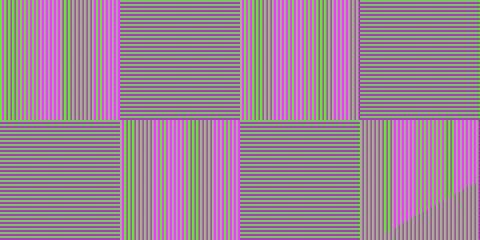
Open the test file and its reference in the same player and flip between them at the same zoom. The reference is 4:4:4, so the player has no chroma to reconstruct, and it goes through the same view transform. These are the references, enlarged:
| 4:2:2: one assumption per row | 4:2:0: across by column, down by row |
|---|---|
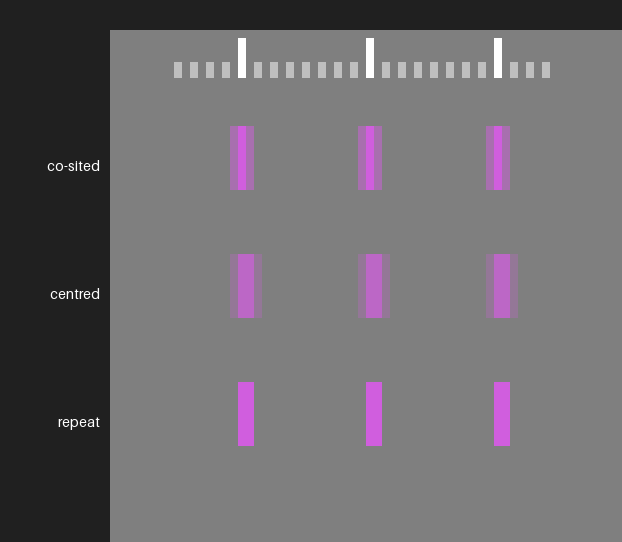 | 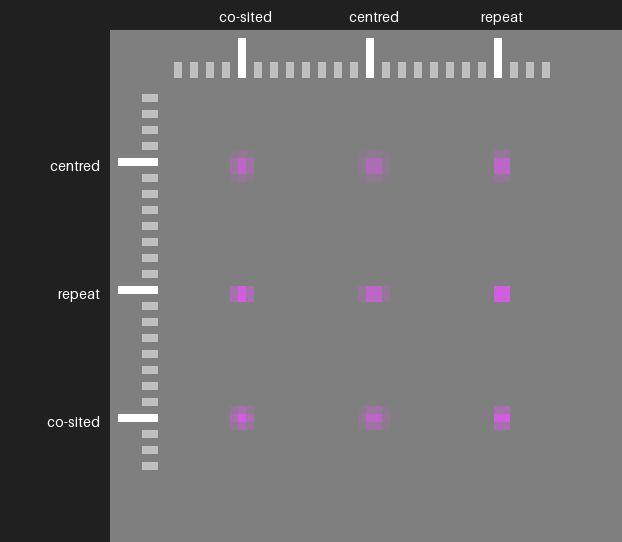 |
Most of each reference shows what wrong players do. Only the top row of the 4:2:2 reference and the top-left square of the 4:2:0 reference are correct for H.264, HEVC, ProRes and DNxHD/DNxHR. A correct player makes every cell of the test file look like that:
| 4:2:2: what a correct player shows | 4:2:0: what a correct player shows |
|---|---|
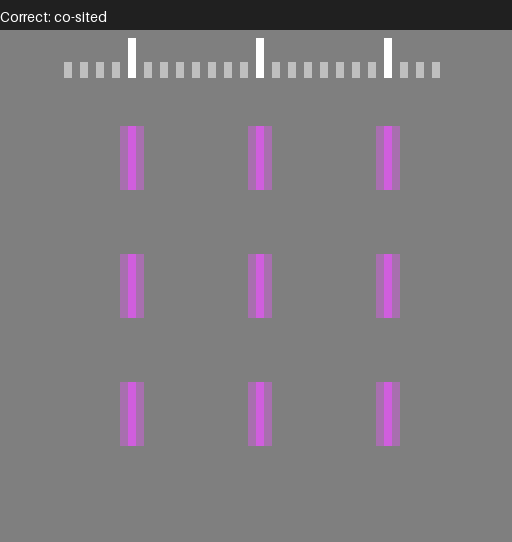 | 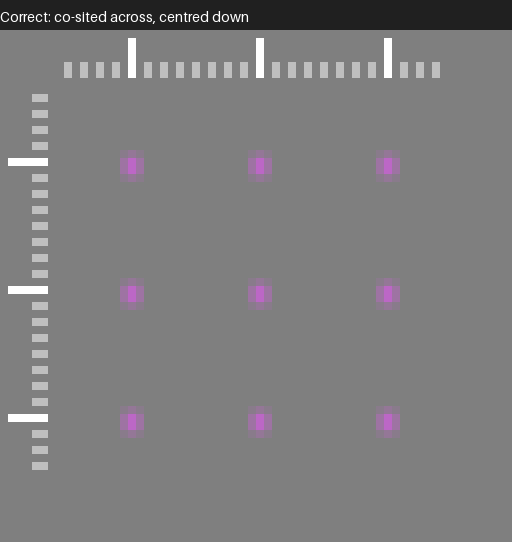 |
These are the exact pixels, enlarged without smoothing. They match the test files decoded with zscale to within about 1 code value in 10 bits, or about one 8-bit code for the 8-bit files (FFmpeg 6.1.6, 7.1.5, 8.1, 9.0.2 and the 9.1 development build, N-127508).
The files are in sourceimages/, lossless FFV1 in Matroska, so they are for desktop players and not browsers: chroma_siting_pixel_chart_422-10bit.mkv, _422-8bit.mkv, _420-10bit.mkv, _420-8bit.mkv, and _422-reference.mkv, _420-reference.mkv.
How a player zooms matters:
- xStudio computes each image pixel in its shader, so any zoom shows the real values. Trust the screen, not the pixel probe: the probe is separate code, and did not have the half-width bug that the screen did.
- OpenRV applies its filter setting (
ntoggles it) to the chroma planes as well as the luma. Under Linear, the default, a zoomed view is smooth, but the peak of the color is where the chroma is. Under Nearest the chroma becomes sample repeat across, which is not what RV shows at normal playback, although the color is still centred half a pixel to the right. Down the picture, 8-bit 4:2:0 is repeated too, but 10-bit 4:2:0 stays blended, so the two look different (OpenRV 3.1.0). Check the chroma position, not the pixel shapes, or use Linear.
Players were measured on macOS 26 (Apple M2) from window screenshots, sampled at the centre of each image pixel, with tests/chroma_siting_pixel_chart.py --capture. FFmpeg was measured by the same script on 6.1.6, 7.1.5, 8.1, 9.0.2 and the 9.1 development build (N-127508); the results are the same on all of them except where a row says so:
| Player or conversion | 4:2:2 10-bit | 4:2:2 8-bit | 4:2:0 10-bit | 4:2:0 8-bit |
|---|---|---|---|---|
zscale | Co-sited | Co-sited | Co-sited across, centred down | Co-sited across, centred down |
| No filter, to planar RGB, up to 9.0.2 | Centred | Centred | Centred both ways | Centred both ways |
No filter, to planar RGB, 9.1.dev (the files are tagged left) | Co-sited | Co-sited | Co-sited across, centred down | Co-sited across, centred down |
| No filter, to packed RGB | Sample repeat (see below for 9.1.dev) | Sample repeat | Repeat across, centred down (see below for 9.1.dev) | Repeat both ways |
| OpenRV 3.1.0 (Linear) | Centred | Centred | Centred both ways | Centred both ways |
| xStudio, with the 4:2:2 fix | Co-sited | Sample repeat | Co-sited across, repeat down | Repeat both ways |
| xStudio 1.4.0 | Co-sited at x=16, mixed at 32, repeat at 48 | Sample repeat | Across as for 4:2:2, repeat down | Repeat both ways |
Wherever a larger chart covers the same case the two agree, so each confirms the other (the 4:2:2 chart has no 8-bit version, so 8-bit 4:2:2 is only measured here). 10-bit to packed RGB is the exception on 9.1.dev: sample repeat is still the nearest of the patterns this chart models, but it is a poor match, and the 4:2:2 player chart reads that conversion as centred bicubic. “Repeat down” puts the 4:2:0 chroma in the right place for H.264 and HEVC (centred between the rows) but without interpolating it.
How this was tested
sourceimages/chroma_siting_chart.png, generated bysourceimages/make_chroma_siting_chart.pyand described insourceimages/README.md, has linear “tents” in blue that peak exactly between two columns (rows), and single-pixel lines on even and odd columns (rows).- The chroma position is where the two sides of the tent meet in the converted chroma plane: a symmetric filter on a linear ramp returns the ramp’s value at the filter’s centre, so this gives the sample position independently of the filter, gain or offset. The lines give the same position a second way, and show whether even and odd columns are treated alike.
- All conversions are to 16-bit 4:2:2 and 4:2:0 written as raw video, so no codec is involved, except the tagging and DNxHR tests, which encode with each codec.
python tests/chroma_siting.py --label 9.0      # once per FFmpeg version
python tests/chroma_siting.py --summarize      # tests/chroma-siting/summary.md
python tests/chroma_siting_containers.py --label 9.0
python tests/chroma_siting_images.py
Each script measures whichever ffmpeg is on the PATH (or FFMPEG_BIN and FFPROBE_BIN). Run it once per FFmpeg version with --label, then --summarize combines the runs into the script’s summary.md. With a rez setup that has an ffmpeg-<version> package per version, --rez 6.0 7.0 ... does both. The scripts need numpy and the OpenImageIO Python bindings (requirements.txt).
The same measurements, and the reverse direction, are also part of the encoding test framework, so they are re-run for each FFmpeg version (enctests/test_configs/chroma_siting_tests.yml and decode_siting_tests.yml). For the reverse direction, sourceimages/make_chroma_siting_sources.py subsamples the chart in numpy at a known siting and stores it as FFV1 in Matroska. The decoded RGB is converted back to full-resolution chroma, and compared with the ideal chroma of the chart shifted by a fraction of a pixel; the shift that matches best is how far the decoder moved the chroma. Both are blurred first, so the converter’s own filter does not affect the result.
The player chart is measured with tests/chroma_siting_player_chart.py: on its own it decodes the FFV1 copy with zscale and libswscale; with --capture it reads screenshots instead. For each band it gives the difference between the test and reference blocks as they would look from a distance (Oklab distance between their linear-light means), the scale check, and, for the top band, which blocks match pixel for pixel, left to right, which is how the xStudio bug showed.
Where this is specified
| Specification | What it says |
|---|---|
| ITU-R BT.601-7 (SD), Part A, sampling structure | “CR and CB samples co-sited with odd (1st, 3rd, 5th, etc.) Y samples in each line” |
| ITU-R BT.709-6 (HD), item 4.3 | CB, CR “co-sited with each other and with alternate Y samples”, “the first active color-difference samples being co-sited with the first active luminance sample” |
| ITU-R BT.2020-2 (UHD), Table 5 | For 4:2:2 and 4:2:0: “The first (top-left) sample is co-sited with the first Y’ samples” |
| ITU-T H.264 and ITU-T H.265, Annex E (VUI) | chroma_sample_loc_type_top_field / _bottom_field, values 0 to 5, for 4:2:0 only, shown in Figure E-1. 0 (left: co-sited horizontally, centred vertically) is the default when nothing is signalled. |
| ITU-T H.273 (07/21 and later) | Adds a coding-independent code point for the 4:2:0 chroma sampling grid alignment, alongside the familiar primaries, transfer and matrix code points |
| AV1 specification, color config semantics | chroma_sample_position, 4:2:0 only: 0 unknown, 1 CSP_VERTICAL “horizontally co-located with (0, 0) luma sample, vertical position in the middle between two luma samples”, 2 CSP_COLOCATED “co-located with (0, 0) luma sample”. There is no value for centred. |
| Matroska, RFC 9559 sections 5.1.4.1.28.23 and .24 | ChromaSitingHorz: 0 unspecified, 1 left collocated, 2 half. ChromaSitingVert: 0 unspecified, 1 top collocated, 2 half. |
| SMPTE ST 377-1:2019 (MXF), section G.2.29, CDCI picture descriptor | ColorSiting: 0 coSiting, “as in ITU-R Rec 601, SMPTE ST 314 4:1:1 or MPEG-2 4:2:2”; 1 horizontal mid-point; 3 quincunx, “as in MPEG-1 4:2:0”; 4 Rec601 (equivalent to 0, deprecated); 5 line alternating; 6 vertical midpoint, “as in MPEG-2 4:2:0 and H.264/AVC 4:2:0”; 255 unknown, the default when absent. (SMPTE standards are not freely available.) |
FFmpeg AVChromaLocation (libavutil/pixfmt.h) | FFmpeg’s own names, with a diagram: left is “MPEG-2/4 4:2:0, H.264 default for 4:2:0”, center is “MPEG-1 4:2:0, JPEG 4:2:0”, topleft is “ITU-R 601, SMPTE 274M …, mpeg2 4:2:2” |
So in FFmpeg’s terms, professional 4:2:2 is topleft (for 4:2:2, which has no vertical subsampling, left and topleft put the chroma in the same place), H.264/HEVC 4:2:0 is left, and BT.2020 4:2:0 is topleft.