Chroma Siting
Table of contents
In short: convert with
zscaleand leave its chroma location at the default. That co-sites the chroma horizontally (and centres it vertically for 4:2:0), which is what 4:2:2 and SDR H.264/HEVC/AV1 4:2:0 expect.scale(libswscale) centres it, half a pixel off, on every FFmpeg version we tested. For BT.2020/HDR 4:2:0 the choice is less clear; see the Summary.
When an image is converted to 4:2:2 or 4:2:0, there is only one chroma (color) sample for every two luma samples across, and for 4:2:0 also for every two down. Chroma siting (or chroma sample location) is where each of those chroma samples sits relative to the luma samples:
- Co-sited: the chroma sample sits on top of the even luma sample. This is what professional 4:2:2 (SDI, ProRes, DNxHD/DNxHR) and H.264, HEVC and AV1 4:2:0 expect horizontally.
- Centred: the chroma sample sits half way between two luma samples. This is the JPEG/MPEG-1 convention.
Vertically, H.264/HEVC 4:2:0 puts the chroma half way between two rows, so the usual target for 4:2:0 is co-sited horizontally and centred vertically. BT.2020 instead defines its 4:2:0 as co-sited in both directions, and specifications disagree about which to use for UHD and HDR, and even for HD; see What specifications ask for.
In FFmpeg, and in tools that follow it (zscale, VapourSynth, mpv and others), these positions have names, which this page uses too:
| FFmpeg name | Horizontally | Vertically (4:2:0 only) | Typical of |
|---|---|---|---|
left | co-sited | centred | H.264/HEVC/AV1 4:2:0 (the default), MPEG-2 4:2:0 |
topleft | co-sited | co-sited | BT.2020 4:2:0 |
center | centred | centred | JPEG, MPEG-1 |
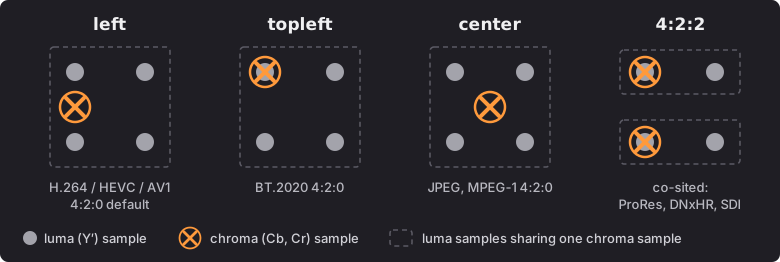
So in FFmpeg, co-sited is usually called left. For 4:2:2, which has a chroma sample on every row, left and topleft are the same position. The names are FFmpeg’s: the standards describe the positions in words or numbers instead (see Where this is specified). And “left” only describes the horizontal position; that it also means vertically centred is FFmpeg’s convention, taken from MPEG-2 and H.264.
If the converter puts the chroma in one place and the player assumes another, the color is shifted half a pixel against the detail. It is subtle, a fraction of a pixel on color edges, but it is systematic, and it accumulates over round trips. For 4:2:2 the position is agreed (co-sited), so a file needs no label; it just has to be made that way. For 4:2:0, H.264, HEVC and AV1 can say where the chroma is, but most players ignore what they say.
Summary
zscalegets it right by default, on every FFmpeg version we tested (6.0 to 9.1.dev): co-sited horizontally, centred vertically for 4:2:0.scale(libswscale), and the conversion FFmpeg inserts when there is no filter, centre the chroma on every version, including the new libswscale code (flags=unstable) and the current development build. 4:2:2 and H.264/HEVC/AV1 4:2:0 made this way are half a pixel off, and are read by players as co-sited.- libswscale can be made to co-site, on 7.1 and later, with
out_chroma_loc=leftand-sws_flags +full_chroma_inp. Withoutfull_chroma_inpit averages pairs of RGB pixels before filtering, and the result is only approximately co-sited. - 4:2:2 needs no label: every standard says co-sited, so the conversion just has to co-site it, and a player that centres it is simply wrong. ProRes, DNxHR and 4:2:2 H.264/HEVC have no field for it, and do not need one.
- 4:2:0 is where the choice is, between
left(the H.264/HEVC/AV1 default) andtopleft(BT.2020). H.264, HEVC and AV1 have a field for it, but only some players read it. For SDR useleft, which is the default and needs no label. For BT.2020/HDR the specifications mostly point totopleft, which must then be signalled, and players disagree (see What specifications ask for). - Reading 4:2:2 or 4:2:0 back to RGB has the same problem in reverse.
zscalereads the file’s chroma location and assumes co-sited when there is none. libswscale, which is what a plainffmpeg -i movie.mov frame.pnguses, assumes centred whatever the file says, up to and including 9.0, so stills from ProRes, DNxHR or H.264 come out with the color half a pixel to the right. See Reading back to RGB. - Players disagree too, and a test chart shows which way each one goes when you look at it from a distance: of those we tried, only xStudio (with a fix) and Safari for HEVC/H.264 got 4:2:2 right throughout. For ordinary H.264/HEVC 4:2:0, Safari, Chrome and Firefox were right and OpenRV was not, and no player besides FFmpeg followed a chroma location tag reliably. See Checking a player by eye.
Use zscale for the conversion, as in the recommended commands in FFmpeg Version Changes and zscale Conversion, and leave its chroma location at the default. The measurements for each converter are in Results by converter.
What it looks like
The test chart has single-pixel blue lines on a grey background. Converted to 4:2:2 and decoded again the way a player would (assuming co-sited chroma), zoomed in. In each image, the columns are: the source, zscale, scale, and scale with out_chroma_loc=left and full_chroma_inp. The bottom row is the difference from the source, amplified 8 times.
Lines on odd columns:
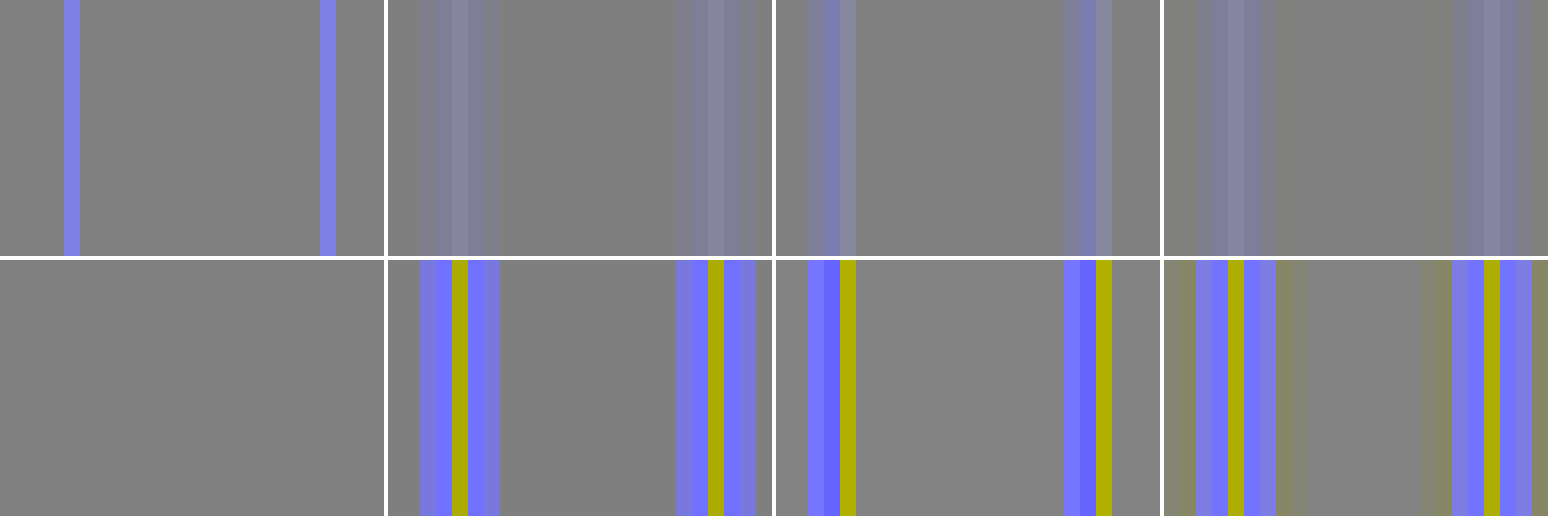
With zscale (second column) the color error is spread evenly either side of each line. With scale (third column) it is all on the left: the line’s color has moved half a pixel. The top row shows how subtle that is at normal viewing; the difference row shows that it is there.
Lines on even columns look the same for all three, which is why this is easy to miss:
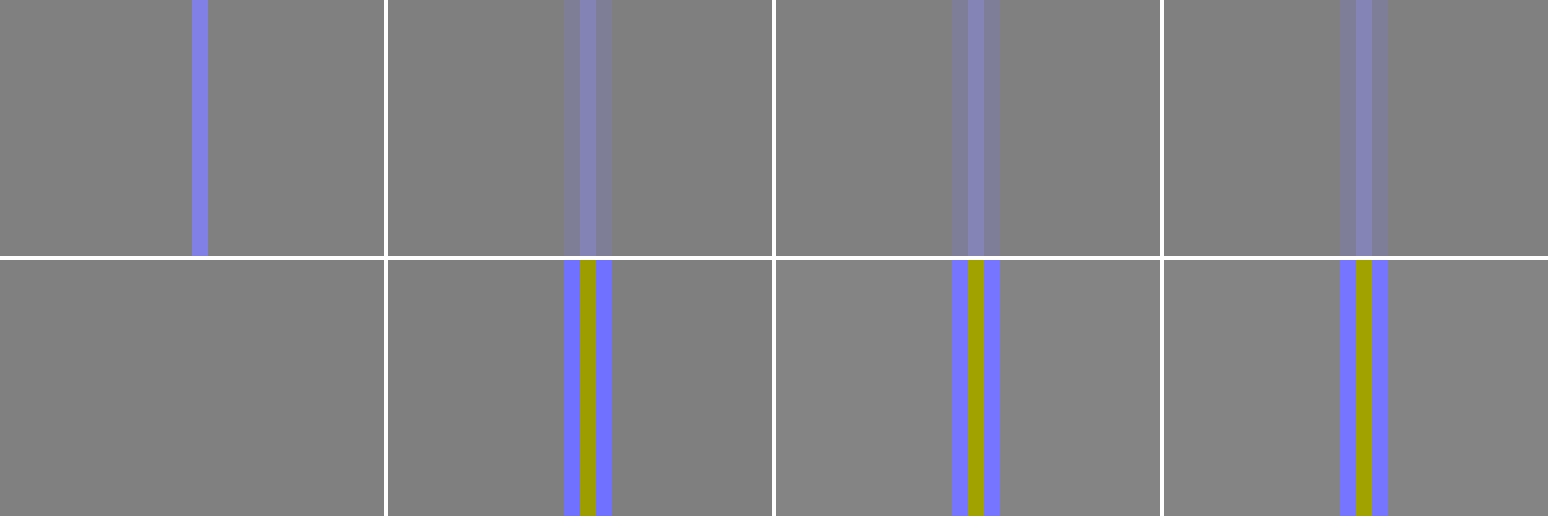
Over repeated round trips
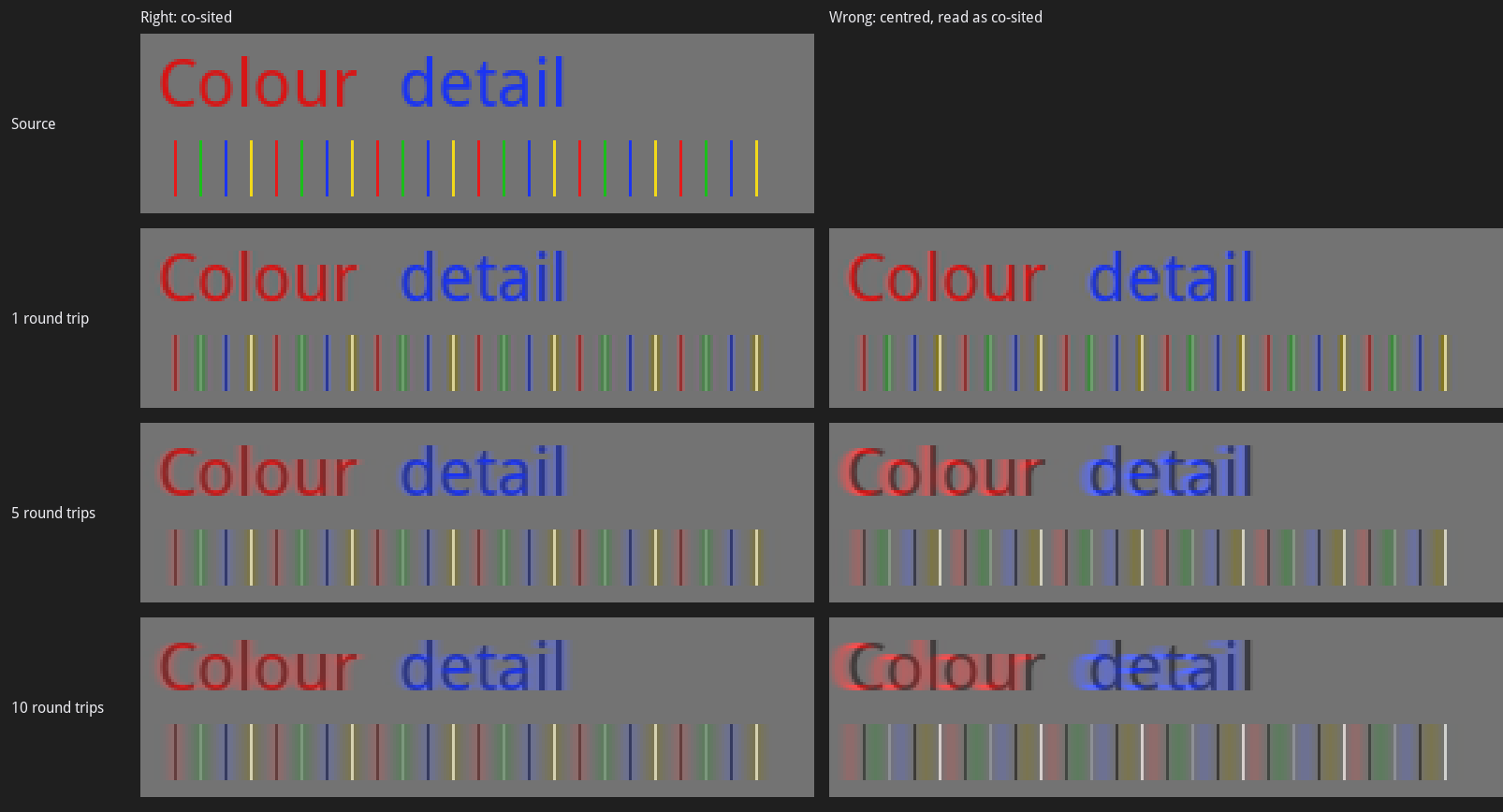
The error is small once, but it adds up: material is often converted to Y’CbCr and back several times, for example rendered, reviewed, graded and delivered. Here a small image goes through 1, 5 and 10 round trips of RGB to 4:2:2 10-bit and back, all with zscale, so the siting is the only difference. On the left the encoder writes co-sited chroma and the player assumes co-sited. On the right the encoder writes centred chroma, as libswscale does, and the player still assumes co-sited, as players do for 4:2:2:
| Round trips | Color moved left, right siting | Color moved left, wrong siting |
|---|---|---|
| 1 | 0.04 px | 0.54 px |
| 5 | 0.03 px | 2.51 px |
| 10 | 0.02 px | 4.00 px |
Some softening is unavoidable with 4:2:2 either way: every round trip loses a little color detail. With the wrong siting the color also moves about half a pixel to the left each time, and after a few round trips it is visibly off the detail. A smooth gradient, by contrast, hardly changes, because shifting it by half a pixel changes almost nothing. Siting errors show on sharp color edges, fine colored lines and colored text. Made with tests/chroma_siting_generations.py; the results were identical on FFmpeg 6.1.6, 9.0.2 and a 9.1 development build (zoomed 3 times with nearest neighbour).
Where chroma siting is recorded
Where the chroma is can be recorded in these places (each codec and container):
- H.264, HEVC and AV1 have a field, for 4:2:0 only.
- ProRes and DNxHD/DNxHR have none, and MOV and MP4 add nothing to what the codec stream carries.
- Matroska and WebM record it for every codec, and FFmpeg reads it back.
- MXF records it, but FFmpeg does not read it back.
Two things follow:
- For ProRes and DNxHR in MOV, and for any 4:2:2 H.264 or HEVC, there is no field, and none is needed: 4:2:2 is co-sited by every standard and read that way, so it has to be made co-sited.
ffprobe’schroma_locationis not always what is in the file. For H.264 it showsleftwhen nothing is written, even for 4:2:2, and for AV1 in MP4 it showedunspecifiedeven when the stream hadleft.
For 4:2:2 MXF, leave zscale’s chroma location at its default (or use topleft), which gives the correct ColorSiting of 0; do not set it to left. DNxHR in MXF made with scale is labelled co-sited while its chroma is centred, so the file states the wrong thing; see DNxHR in MXF.
What specifications ask for
For 4:2:2 there is no disagreement: it is co-sited, and in ProRes, DNxHR and 4:2:2 H.264/HEVC there is nowhere to say otherwise. For 4:2:0 the choice is between left (H.264/HEVC VUI type 0, co-sited horizontally and centred vertically) and topleft (type 2, co-sited both ways). Most of the specifications that choose are written for a particular kind of device, and they do not agree:
| Specification | Applies to | 4:2:0 siting |
|---|---|---|
| ITU-T H.264 / H.265, Annex E | Every H.264/HEVC decoder | left (0) when nothing is signalled. H.265 has recommended topleft (2) for BT.2020 and BT.2100 video since its 2018 edition, according to Dolby and 3GPP (we have not checked the ITU text) |
| ITU-T H.Sup19 / ISO/IEC TR 23091-4, typical values | Guidance, summarising the delivery specifications | left (0) for SD and HD, topleft (2) for UHD with wide color gamut |
| DVB, ETSI TS 101 154 V2.9.1, clause 5.14.1.5.3 (HEVC) | Broadcast receivers and set-top boxes in Europe and most of the world outside the Americas, Japan and Korea | The siting shall be signalled; recommends left (0) for progressive BT.709 and topleft (2) for progressive BT.2020. (For H.264 it recommends 0.) |
| ATSC 3.0, A/341:2024, section 6.2.3.2 | Broadcast receivers (“NextGen TV”) in the US and Korea | topleft (2), required for all progressive video, including 1080p and 720p BT.709 SDR. left (0) for legacy SD and interlaced HD (Amendment 1, 2022) |
| Blu-ray Disc (BD-ROM Part 3) | HD Blu-ray (H.264, VC-1, MPEG-2) and Ultra HD Blu-ray (HEVC) players | The specifications are not public. H.Sup19 cites BD-ROM Part 3 v3.2 for topleft (2) in UHD wide color gamut, and Dolby’s profile 7 (the Ultra HD Blu-ray profile) defaults to topleft. Encoder users report that a BT.2020 disc must signal 2 and a BT.709 one may use 0 or 2. For HD Blu-ray we have found nothing beyond the H.264/MPEG-2 default, left |
| Dolby Vision profiles | Dolby Vision devices: profile 5 and 8.1 for streaming, 7 for Ultra HD Blu-ray, 8.4 for HLG | Either, but the VUI must say so unless it is left. Default left (0) for profile 5 (“all commercially produced profile 5 … bitstreams have used center-left siting”), for the HDR10 base layer of profile 8.1 and for the DVB HLG base layer of 8.4; topleft (2) for profile 7 and for the ARIB (Japanese broadcast) HLG base layer of 8.4 |
| Apple HLS authoring specification | Streaming to Apple devices | Says nothing about siting, so left, the H.264/HEVC default |
Where they disagree:
- HD: a 1080p BT.709 HEVC stream for ATSC 3.0 must be
topleft; the same stream for DVB is recommended to beleft, which is also what H.264/HEVC readers assume when nothing is signalled. - HDR10 and HLG: H.265, DVB, ATSC and Ultra HD Blu-ray point to
topleftfor BT.2020/BT.2100, but most streaming HDR (Dolby Vision profile 5, and the HDR10 base layer of profile 8.1) isleft, and Dolby’s own default for a DVB HLG base layer isleftwhere DVB recommendstopleft. - Players: Dolby notes that
topleftis checked when a Dolby Vision chip is approved, but not when a device is. A player that ignores the VUI treatstopleftmaterial asleft, and puts the chroma half a line too low, as Firefox does. The reverse also happens: on a Mac, Safari 26.6, Chrome 157 and QuickTime Player showed HDR10 HEVC taggedtopleftexactly right, but untagged orleftHDR10 neither centred nor co-sited down, though the same SDR files were right (measured). So on a Mac no choice is right in every player. To check a player or TV, there are HDR10 copies of the 4:2:0 chart with and without thetoplefttag.
So for anything that is not going to a broadcaster or onto a disc with its own specification (review files, web and streaming, files played on desktops and phones), use left, the zscale default. Use topleft when the delivery specification asks for it: ATSC 3.0, Ultra HD Blu-ray, and BT.2020 HEVC for DVB.
Should the siting always be signalled?
Signalling it is safe, but it is not enough on its own:
- Most players ignore the tag (see Checking a player by eye): of those we tried, only FFmpeg followed it reliably. So the pixels have to be where players assume,
left, unless a specification says otherwise. Atopleftfile is shown correctly only by a player that reads the tag. - Signalling
leftcosts nothing, and DVB requires the siting to be signalled for HEVC. It is not needed elsewhere, sinceleftis what H.264/HEVC readers assume when nothing is written. - Signalling
topleftis essential: without it every reader assumesleft. - It can only be signalled for 4:2:0 H.264, HEVC and AV1, and in Matroska. For ProRes, DNxHR and any 4:2:2 in MOV or MP4 there is nothing to set; co-siting the chroma is all you can do (see Where chroma siting is recorded).
A label that disagrees with the pixels is worse than no label, so set the siting on the conversion, with zscale’s chromal. That puts the chroma there and labels the frames, and the encoder writes the label (for BT.2020, use the matching matrix and primaries as well):
ffmpeg -i input.%04d.png -vf "zscale=matrix=709:range=limited:chromal=left:filter=lanczos,format=yuv420p10le,setparams=color_primaries=bt709:color_trc=iec61966-2-1" -c:v libx265 -crf 18 -colorspace bt709 output.mp4
What we measured, with libx265 and libx264 4:2:0 on FFmpeg 6.1.6, 7.1.5, 8.1, 9.0.2 and a 9.1 development build:
| Command | Pixels | What is written |
|---|---|---|
zscale with no chromal | left | Nothing (the frames carry no location), which readers take as left |
zscale=...:chromal=left | left | libx265: type 0. libx264: nothing, because x264 never writes type 0, even with -x264-params chromaloc=0 |
zscale=...:chromal=topleft | topleft (measured 0.00 px horizontally, 0.02 vertically) | Type 2 with both encoders |
scale | Centred | Nothing, so it is read as left: half a pixel off |
The options that only set the label do not move the chroma, so with scale, or with zscale at its default and a topleft label, they give a file whose label is wrong:
-chroma_sample_locationrelabelled the frames without converting on 6.1.6, 8.1 and 9.0.2, was ignored on 7.1.5, and on the 9.1 development build madezscaleconvert to it. Do not rely on it.setparams=chroma_location=(FFmpeg 7.1 and later) only relabels.-x265-params chromaloc=overrides whatlibx265writes, whatever the pixels are.
FFmpeg’s wrappers for libx264, libx265, libsvtav1 and the VAAPI/Vulkan H.264 encoders pass the location on; libaom-av1 writes unknown (measured), and the VideoToolbox and NVENC wrappers have no code to pass it on (from the FFmpeg source; not measured).
To check what a file says, read the bitstream; ffprobe’s chroma_location shows a default when nothing is written:
ffmpeg -i output.mp4 -c copy -bsf:v trace_headers -f null - 2>&1 | grep -E "chroma_loc_info_present_flag|chroma_sample_loc_type|chroma_sample_position"
For H.264/HEVC, chroma_loc_info_present_flag 0 (or no line) means nothing is written; 1 is followed by the type. For AV1, chroma_sample_position is 0 (unknown), 1 (left) or 2 (topleft). In 4:2:2 MXF, topleft is also the value that gives the correct ColorSiting (see DNxHR in MXF).
Reading back to RGB
When FFmpeg converts 4:2:2 or 4:2:0 to RGB, for example to make review stills from a ProRes or H.264 file, it has to decide where the chroma samples are before it can interpolate them. zscale reads the file’s chroma location and assumes co-sited when there is none, which is correct. libswscale (scale, or no filter) assumes centred whatever the file says, on every release tested (6.1 to 9.0). The 9.1 development build follows the tag if there is one, and still assumes centred if there is not (measurements).
So a co-sited file, which is every ProRes, DNxHR and 4:2:2 H.264/HEVC file and most H.264/HEVC 4:2:0, converted to RGB without a filter comes out half a pixel off on every released version. With 9.1 that will only be fixed for files that carry a chroma location, which in MOV and MP4 is only 4:2:0 H.264/HEVC with a non-default location (see Where chroma siting is recorded). Use zscale:
ffmpeg -i input.mov -frames:v 1 -vf "zscale,format=gbrp16le" -pix_fmt rgb48be frame.png
format=gbrp16le keeps the conversion in zscale (it outputs planar RGB; the repack to rgb48be for PNG is lossless). zscale needs the file’s matrix to be tagged; for an untagged file give it with zscale=matrixin=709:rangein=limited. The matrix and range accuracy of the conversion, and what happens with untagged files, are covered in FFmpeg Version Changes.
Checking a player by eye
Most players and browsers cannot be measured from a script, so there are test charts you can look at instead. They are in sourceimages/. How they work, and the results in detail, are on the separate Chroma Siting Tests page.
Quick guide: what should I see?
There are two kinds of chart. The player charts are full HD: you look at them from a distance, and a whole band changes appearance. The pixel charts are 64x64: you zoom in and look at single pixels. Start with a player chart; use a pixel chart to confirm the result or to show someone exactly what is wrong.
| Chart | Open | Correct | Not correct |
|---|---|---|---|
| 4:2:2 player chart | chroma_siting_player_chart_422-prores.mov or -hevc.mp4 | Only the top band, “Co-sited”, is a flat field. The other three are still checkerboards | A different band is flat: the player assumes that instead. None flat: it is doing something else. The top band changes part way across: part of the picture is wrong (xStudio 1.4.0) |
| 4:2:0 player chart | chroma_siting_player_chart_420-h264.mp4 or -hevc.mp4 | Two bands are flat: “Across: co-sited” and “Down: centred”. The other two are checkerboards | “Across: centred” is flat instead of “Across: co-sited”: the color is half a pixel to the right (OpenRV, xStudio 8-bit). “Down: co-sited” is flat instead of “Down: centred”: the player assumes topleft |
| 4:2:2 pixel chart | chroma_siting_pixel_chart_422-10bit.mkv | One strong column of color directly under each long tick, with a fainter column either side | The color is off to the right of the tick: two strong columns starting at the tick (centred, or sample repeat) |
| 4:2:0 pixel chart | chroma_siting_pixel_chart_420-10bit.mkv | Across, as for 4:2:2. Down, two equally strong rows: the row of the long tick on the left and the row below it | The color is off to the right of the top ruler’s tick. Centred on the left ruler’s tick row: the player assumes topleft |
The same pattern is correct for all the H.264, HEVC and AV1 files with no chroma location tag. The tagged 4:2:0 files change the answer on purpose: -topleft should make “Across: co-sited” and “Down: co-sited” flat, and -center should make “Across: centred” and “Down: centred” flat, if the player reads the tag (details).
Three things catch people out:
- Player charts only work at exactly 100%, viewed from a distance. Their scale check patch, top right, should have two halves equally bright from a distance. If not, ignore the bands.
- The color of a flat band means nothing. Each band has its own colors; only whether it is flat matters.
- Pixel charts work at any zoom, but in OpenRV stay on the default Linear filter. Flip against the matching
-reference.mkvin the same player to compare, and judge where the color is centred, not how blocky it looks.
Zoomed in on one cell of a pixel chart, with lines through the long ticks. In 4:2:0 the correct color is centred on the vertical line and straddles the row below the horizontal line:
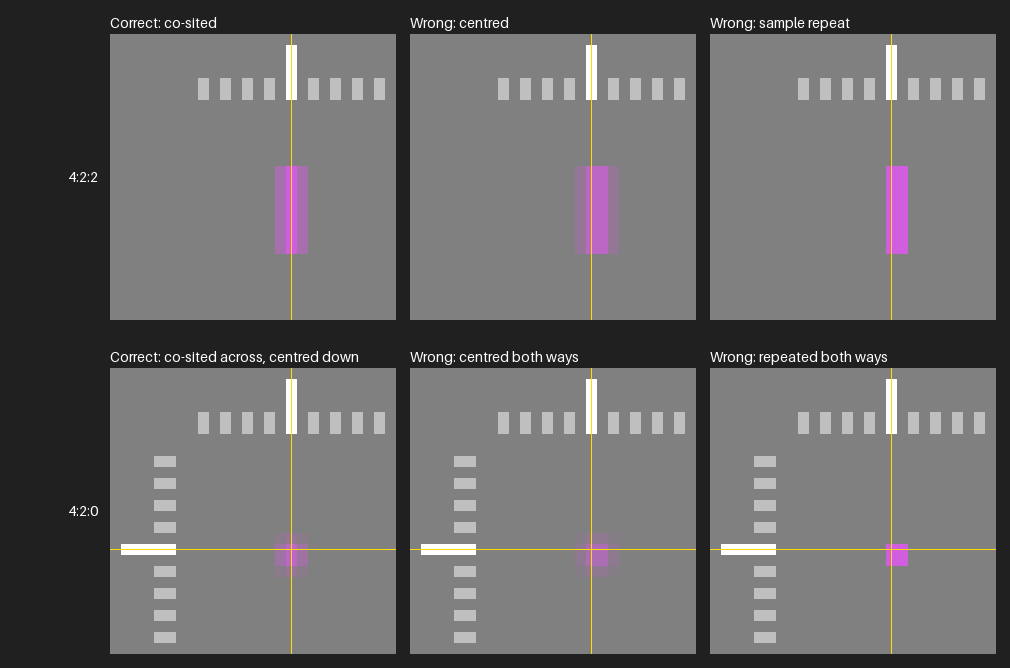
A wrong result means fine color detail sits half a pixel to the right of the luma, or is softer than it should be. It is the player, not the file: these charts decode exactly in zscale.
What we found
Measured on macOS 26 (Apple M2), at one image pixel per screen pixel. The test page has the results per codec and FFmpeg version, and how the charts work.
| Player or conversion | 4:2:2, should be co-sited (BT.709 item 4.3) | Ordinary H.264/HEVC 4:2:0, should be left: co-sited across, centred down (H.264/H.265 Annex E default) | Reads the chroma location tag? |
|---|---|---|---|
zscale | Correct | Correct | Yes |
| libswscale, up to 9.0 | Centred, or sample repeat | Centred both ways | No |
| Safari 26.6.2 | Correct for HEVC and H.264; ProRes wrong | Correct; HDR10: down neither centred nor co-sited | HEVC topleft and center, H.264 center (8- and 10-bit), HDR10 HEVC topleft: yes. H.264 topleft (8- and 10-bit): no, shown centred both ways |
| Chrome 156 and 157 | Correct for HEVC; H.264 centred | Correct, except 10-bit H.264 centred across; HDR10: down neither centred nor co-sited | HEVC topleft and center, 8-bit H.264 center, HDR10 HEVC topleft: yes. H.264 topleft (8- and 10-bit): no, shown centred both ways |
| Firefox 152 (HDR10: 159) | HEVC wrong: chroma also lost vertically | Correct, including HDR10 | No |
| OpenRV 3.1.0 | Centred | Centred both ways | No |
| xStudio, with the 4:2:2 fix (not yet merged) | 10-bit correct; 8-bit sample repeat | 10-bit correct; 8-bit centred across | No |
xStudio 1.4.0 has the same results as the fixed build, except that in 10-bit only the left half of the picture is interpolated.
QuickTime Player 10.5 (4:2:0 only, HEVC) behaves like Safari: correct, follows topleft, and for HDR10 is neither centred nor co-sited down unless the file is tagged topleft.